Installing and Running XHub
English | 简体中文 · Project home
XHub runs as two services: a Go API gateway on port 4000 and a Next.js console on port 3000. PostgreSQL stores configuration, identities, and usage. Redis is optional for a source installation; the Docker stack includes it.
Requirements
| Dependency | Version | Purpose |
|---|---|---|
| Go | 1.25 | Build and run the gateway |
| Node.js | >=24.14.1 | Build and run the console |
| npm | >=11.10.0 | Install console dependencies |
| PostgreSQL | 16 recommended | Required persistent storage |
| Redis | 7 recommended | Optional shared runtime state |
| Docker with Compose | For the Docker path | Run the local stack |
Use a fresh PostgreSQL database.
Docker Compose
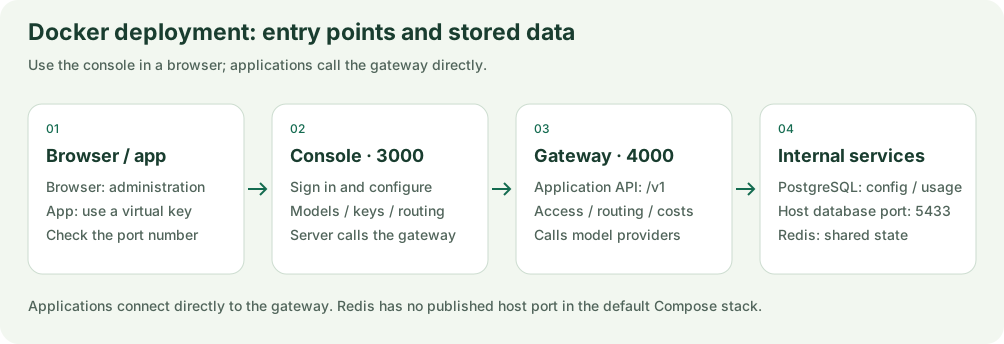
Figure 1: Entry points and service responsibilities. Browsers use the console; applications call the gateway directly. See the configuration below for connections.
Clone the repository and build the gateway and console locally:
git clone https://github.com/qiniu/xhub.git
cd xhub
bash deploy/build.sh
docker compose up -d
The build script needs Go, Node.js, npm, Docker, and a readable system CA bundle. It detects /etc/ssl/certs/ca-certificates.crt (Debian/Ubuntu), /etc/pki/tls/certs/ca-bundle.crt (RHEL family), and /etc/ssl/cert.pem (macOS/Alpine); set XHUB_CA_CERT_FILE for another location. It downloads the Linux Node.js binary from npmmirror and targets your host CPU architecture (amd64 or arm64). Runtime images contain the prebuilt output; they do not compile the application. The console uses postgres:16 as its runtime base for glibc. Ensure that postgres:16 and redis:7-alpine are available to Docker.
| Service | Address |
|---|---|
| Console login | http://localhost:3000/login |
| Gateway API | http://localhost:4000 |
| PostgreSQL from the host | 127.0.0.1:5433 |
The Docker development account is admin@xhub.local / admin-pass-1234. Change it before exposing the deployment. The account is created only if its email does not already exist; changing the configured password does not reset an existing account. Use the console to change an existing password.
Run from Source
1. Start PostgreSQL
You can use the repository's Compose database:
docker compose up -d postgres
cp configs/config.example.yaml configs/config.yaml
Edit configs/config.yaml for that database:
general_settings:
  database_url: postgres://xhub:xhub_dev_password@127.0.0.1:5433/xhub?sslmode=disable
  redis_url: ""
  store_model_in_db: true
  admin_email: os.environ/XHUB_ADMIN_EMAIL
  admin_password: os.environ/XHUB_ADMIN_PASSWORD
  disable_env_credential_login: false
Replace the template's general_settings section, keeping model_list. Alternatively, point database_url at your own new PostgreSQL database. The template uses port 5432 and password xhub; the Compose database uses host port 5433 and password xhub_dev_password.
An empty redis_url disables Redis. If you use Redis, set it to an address reachable from the gateway process. The Compose Redis service is not published to the host by default.
2. Start the Gateway
Set the initial administrator credentials in the same terminal that runs the gateway:
export XHUB_ADMIN_EMAIL="admin@example.com"
export XHUB_ADMIN_PASSWORD="replace-with-a-strong-password"
make run
The gateway reads configs/config.yaml and listens on port 4000. Missing environment variables resolve to empty strings, so no initial account is created when these credentials are absent. Once the account exists, password changes go through the console.
3. Start the Console
In another terminal, from the repository root:
make uiOpen http://localhost:3000/login and sign in with the credentials you set above.
Connect a Provider and Make a Request
A new installation starts without configured providers or deployments.
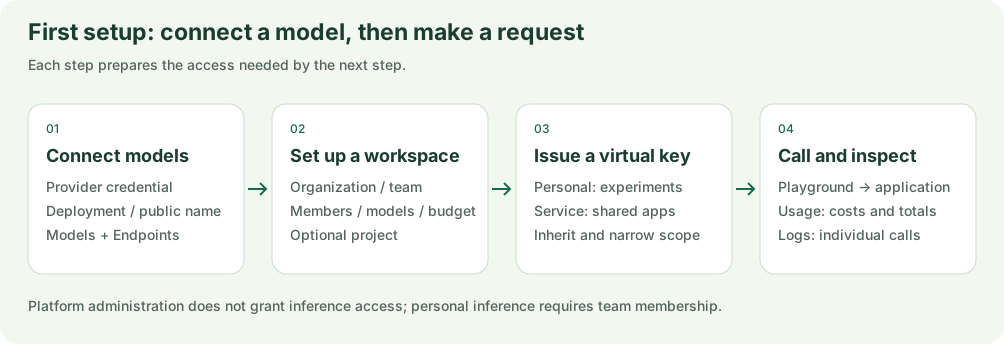
Figure 2: Recommended setup order. Configure team membership and key access before testing a request.
- Open Models + Endpoints, choose a provider type, and enter its connection and authentication fields.
- Add a model deployment manually or from a provider catalog. Set its public model name, upstream model, and endpoint types.
- Create an organization and team, set the team model scope, and add members. Standalone users can also use personal keys; an unset personal budget imposes no monetary cap. Projects are optional.
- Issue a personal or service virtual key within that scope, then test in the Playground or call the gateway.
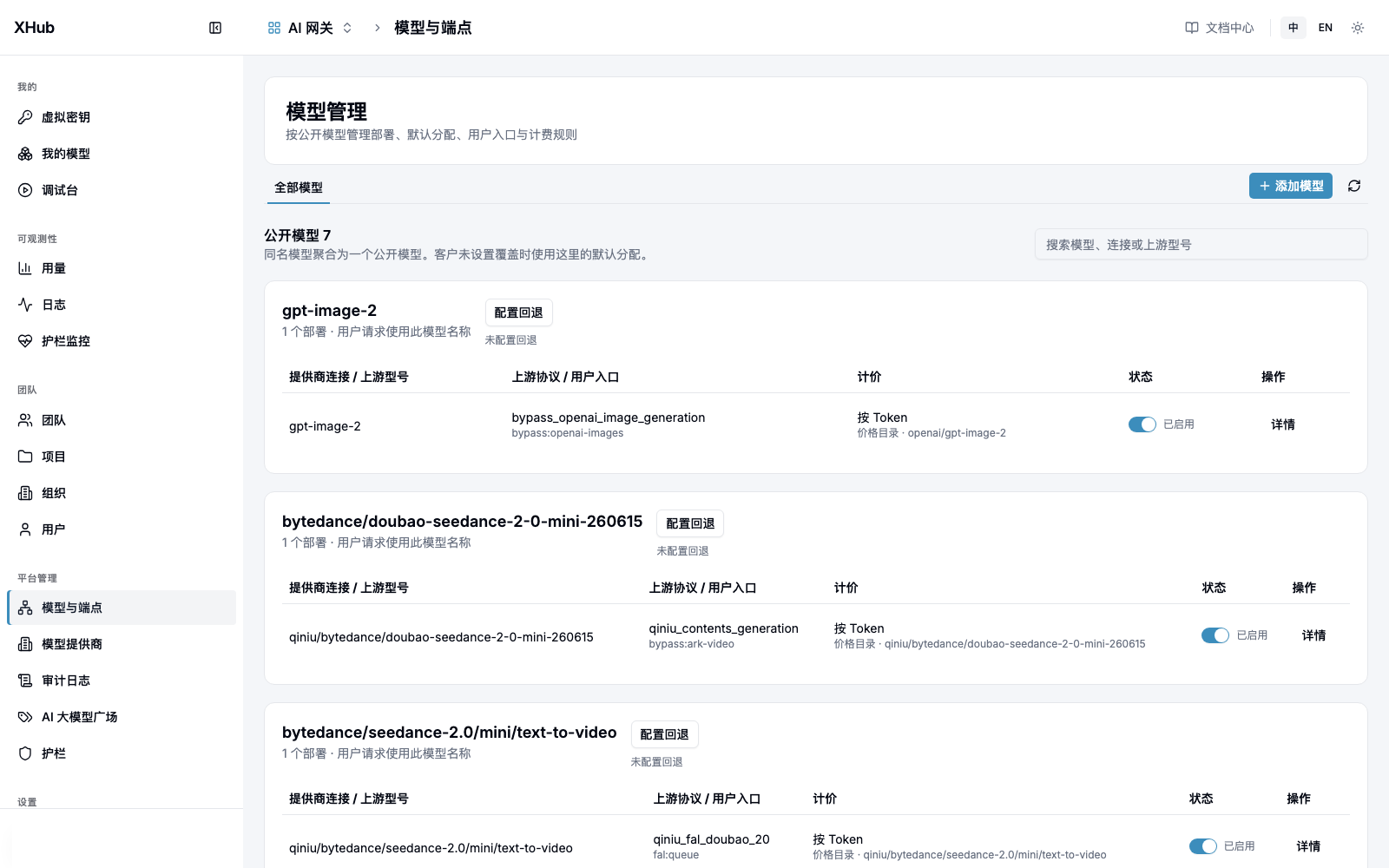
Figure 3: Configure credentials in Providers, then use Add Model to add a deployment. Check the public name, upstream model and operation capability. Click the screenshot to open the full image. Example models and prices are not installation defaults.
Follow the user and administration guide for the complete workflow and permission boundaries.
Install the Python client with pip install openai, then use your XHub key and the public model name you configured:
from openai import OpenAI

client = OpenAI(
    api_key="YOUR_XHUB_VIRTUAL_KEY",
    base_url="http://localhost:4000/v1",
)

response = client.chat.completions.create(
    model="YOUR_PUBLIC_MODEL_NAME",
    messages=[{"role": "user", "content": "Hello, XHub!"}],
)
print(response.choices[0].message.content)
The client URL points to the gateway, not the console.
Deployment Configuration
- Set
XHUB_PUBLIC_ORIGINon the gateway to its public API origin, such ashttps://api.example.com. - Set
NEXT_PUBLIC_BASE_URLbefore building the console when the browser should use a different gateway address. - Set
XHUB_GATEWAY_ORIGINon the console for its server-side gateway routing; it must be reachable from the console process. - Use
os.environ/VARIABLE_NAMEin configuration to read secrets from the environment. For Docker, updateconfigs/config.docker.yaml, pass the corresponding environment variables to the gateway service, and rebuild its image. - The optional
master_keyis for bootstrap and emergency access. It is not a console login or a regular application key.
See permissions for platform, organization, team, and member scopes.
Development and Verification
Start with the developer and coding-agent guide, then choose checks from the testing guide for the affected code. Basic Go checks and fake-provider regression:
make test
make regression
Some database tests skip when no database is available. Start local PostgreSQL or set XHUB_TEST_DATABASE_URL, and inspect the output for skipped checks. Tests use isolated schemas. Run frontend checks against affected files as described in the testing guide.
For browser tests, install Chromium once with cd frontend && npx playwright install chromium, then run make e2e-offline from the repository root. Offline tests use isolated data and local provider fixtures. make e2e instead verifies a prepared shared baseline and can call paid providers. See the testing guide for prerequisites. make regression-live is a separate paid check that calls real providers and requires explicit provider credentials.
Documentation Boundaries
The user guide covers customer workflows; development references document current implementation. Package-level readme.md / readme_cn.md files explain modules in both languages. Temporary plans and execution records are not product promises.
Administrators explicitly create providers by selecting a type and entering its authentication fields. Manual price refresh and enabled scheduled reload use https://api.modelink.ai/v1/market/models by default. XHUB_PRICE_FEED_URL selects another feed; refresh failures preserve the current catalog. Operator overrides remain independently managed.