XHub Customer Guide
English | 简体中文 · Documentation
This guide takes a workspace from its first model to everyday administration. Install the services using the installation guide, then follow the steps below. Console paths refer to the web console, normally on port 3000; application requests use the gateway, normally on port 4000.
1. Set up your first workspace
Complete these steps with a platform administrator account:
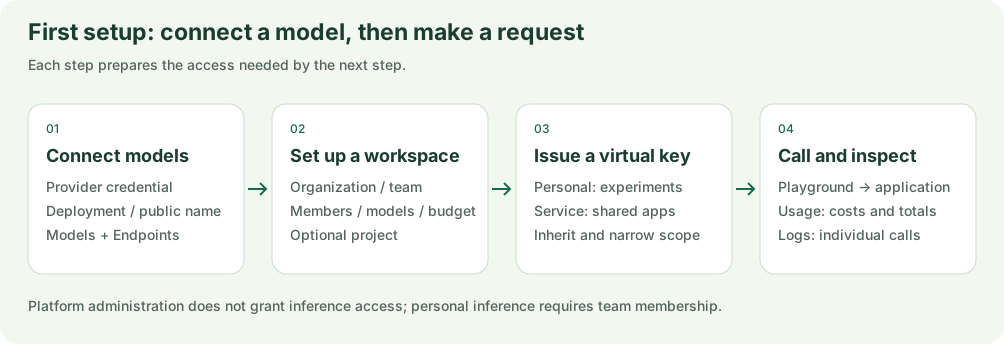
Figure 1: Set up models and access before issuing keys, testing requests and inspecting usage. The steps below follow these four stages.
- Sign in at
/login. The local Compose setup starts withadmin@xhub.local/admin-pass-1234. Change the password in your profile before exposing the instance. - Open Models + Endpoints (
/models-and-endpoints). Add a provider credential, then a model deployment. Check its public model name, upstream model ID, supported operation, API base, and price. - Create an organization at
/organizations, then a team at/teams. Set the team's model scope and budget. The creator becomes its first team administrator unless another administrator is supplied. - Add accounts at
/userswith an email and a password of at least eight characters. Select their team and team role. To add an existing account, use its email in the team's member management. - Optionally create a project at
/projectsfor an application or cost center. - Create a personal or service virtual key at
/api-keys, within that team's scope. - Test an available model in
/playground, make an application request, and confirm its usage at/usageand request details at/logs.
Platform administration and inference access are separate. A platform administrator also needs team membership to use personal inference access.
2. Connect models correctly
| Item | Meaning |
|---|---|
| Provider credential | The upstream connection: provider, API base, and provider secret |
| Model deployment | A model and supported operation attached to a credential |
| Public model name | The name applications send to XHub |
| Upstream model ID | The model identifier XHub sends to the provider |
| Price catalog | Pricing information; it does not create a deployment or grant access |
Several deployments can share a public model name. This gives routing a choice of upstreams without changing the application's model name.
Step 1: Add a model provider
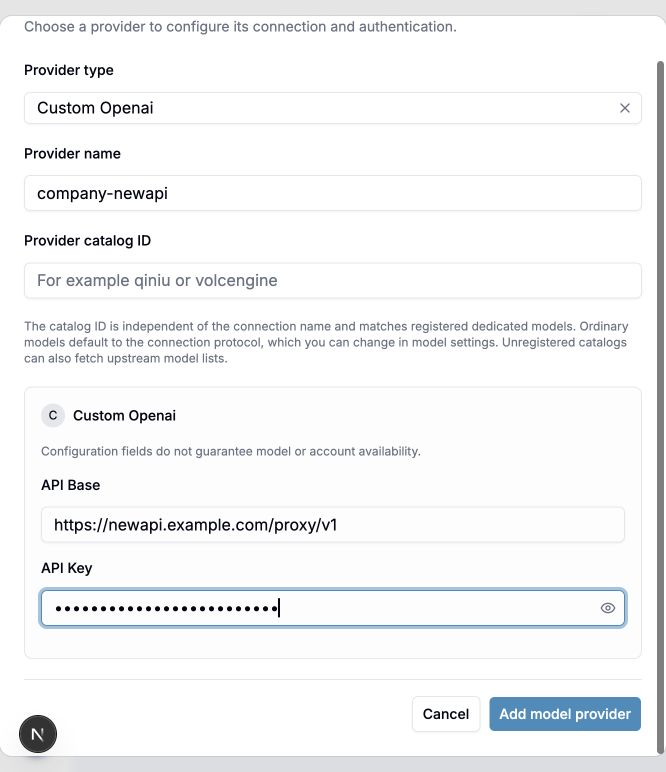
Open Model providers and add a provider. For this example, select Custom Openai and name it company-newapi. Enter the address and API Key only in this provider connection. Leave the provider catalog ID empty for ordinary Chat models. The screenshot uses a fictional address and a masked demonstration key; do not use those values for a real connection.
Step 2: Add a model deployment
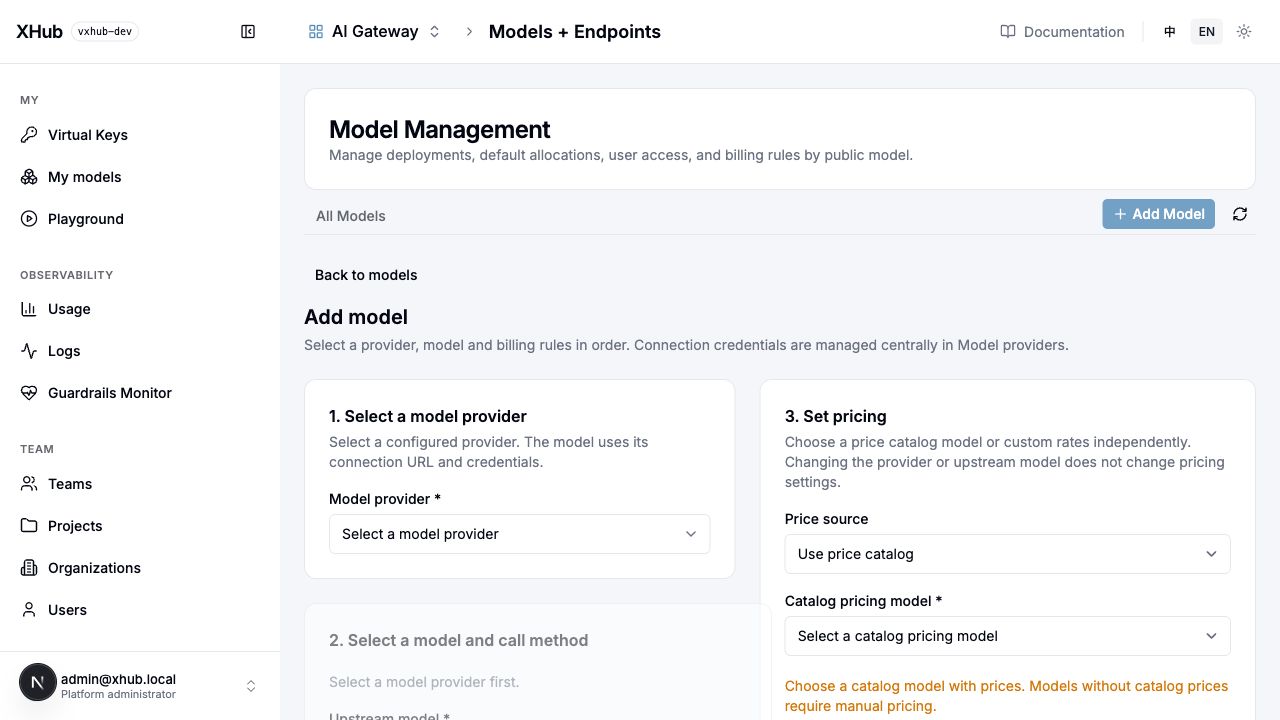
Save the provider, then open Model Management → Add Model. Select the saved provider first, then enter an upstream model ID confirmed by your supplier, a public model name, the upstream protocol, and pricing. The screenshot shows the initial form before a provider is selected: complete step 1 to enable step 2. Do not repeat the address or secret in the model, and do not edit model_list. Click either image to view the original.
For NewAPI field details, a real gateway request, and the development work required for currently unimplemented Suno support, see the custom provider integration guide.
After saving a dialogue deployment, a platform administrator can run Test connection. The server uses the saved provider credentials and deployment ID to send a minimal real English dialogue request. This test does not support media deployments. It bypasses gateway key quotas, routing, cooldown, and gateway usage accounting, but the provider may still execute and charge for the request. A successful result confirms only this probe; it does not prove that streaming, tools, images, asynchronous operations, or the application's complete production request will work.
3. Assign the right administrators
Account roles, organization roles, and team roles are separate assignments. A person can hold more than one.
| Role | Everyday responsibilities | Boundaries |
|---|---|---|
| Platform administrator | Configure providers/models, create accounts and organizations, create/delete/move teams, set team models and budgets, block teams, inspect all usage/logs | Inference still requires its own authorized scope |
| Organization administrator | Manage its organization's name and administrators, team names/members/projects, organization usage/logs | Cannot create/delete teams, change team models/budgets, or read other people's personal secrets; this role alone does not grant service-key management |
| Team administrator | Manage its team's members, projects and user allocations; inspect aggregate team usage | Cannot change team model scope/budget or platform account roles |
| Member | Use permitted models and manage personal keys; inspect personal usage/logs | Cannot administer other members |
Only platform administrators create accounts. Account creation does not send an invitation email. Password recovery currently uses a direct administrator reset rather than an email reset link. A team administrator cannot reset a platform or organization administrator's password. Password changes invalidate older sessions, so the affected user must sign in again.
The last team administrator cannot be removed or demoted. Assign a replacement before changing that membership. Detailed endpoint rules are in the developer permission reference.
4. Organize access and budgets
Resources follow organization → team → project. Use teams for a shared access boundary and projects for applications within that boundary.
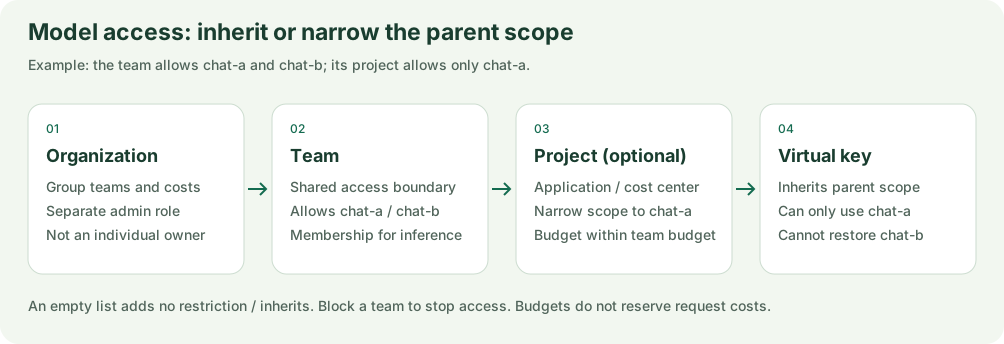
Figure 3: A scope diagram, rather than a console screenshot. Projects and keys inherit or narrow access; they cannot grant a model outside the team's scope.
- The team establishes the available model scope. An empty team model list means no restriction at that level.
- An empty project or key model list inherits its parent scope. A nonempty list narrows it and cannot grant models outside that parent.
- A project budget cannot exceed the team budget.
- To stop a team's access, block it. Clearing its model list does not disable it.
For example, a team allowed chat-a and chat-b, with a project narrowed to chat-a, can issue a project key for chat-a; that key cannot restore chat-b.
Budgets check recorded spend plus available hot spend. They do not reserve the cost of requests in advance: concurrent requests, long streams, and asynchronous tasks can overshoot a budget. Use conservative budgets and monitor provider charges as well.
5. Issue and manage virtual keys
| Key type | Recommended use | Management and departure behavior |
|---|---|---|
| Personal key | An individual developer's scripts and experiments | Owned by that person within a team, optionally a project. Secret access is restricted to the owner and platform administrators. Removing team membership preserves personal keys; new requests validate current membership, key scope, and billing authorization. |
| Service key | A shared application, backend, or scheduled job | Owned by a team or project, managed by team/platform administrators. It remains active when a member leaves; rotate it if that member knew its secret. |
Open Virtual Keys → Create New Key and give each application a recognizable key name. Inspect model access, key type, maximum budget, RPM/TPM, budget reset, route template, expiry and rotation before creating it. The current creation dialog includes RPM/TPM; they are not restricted to editing existing keys. Blank quotas share the owner's available parent capacity; they do not bypass parent limits. Keep the generated secret in an environment variable or secret store, never in documentation screenshots.
When creating or updating a key through the API, duration accepts a positive integer followed by s, m, h, or d, such as 30m, 12h, or 7d. An empty string creates a key without an expiry. Zero, negative, malformed, and overflowing durations are rejected.
Use XHub virtual keys in applications. Provider secrets connect XHub to upstreams; master credentials are for bootstrap/emergency administration; session tokens serve console sessions. Virtual keys do not grant console administration.
6. Make an application request
Open /models-and-endpoints/mine (My models) to inspect models available to your account, then select Use in Playground on a card to test it. A configured deployment does not automatically grant access to every account; check team membership and model scope.
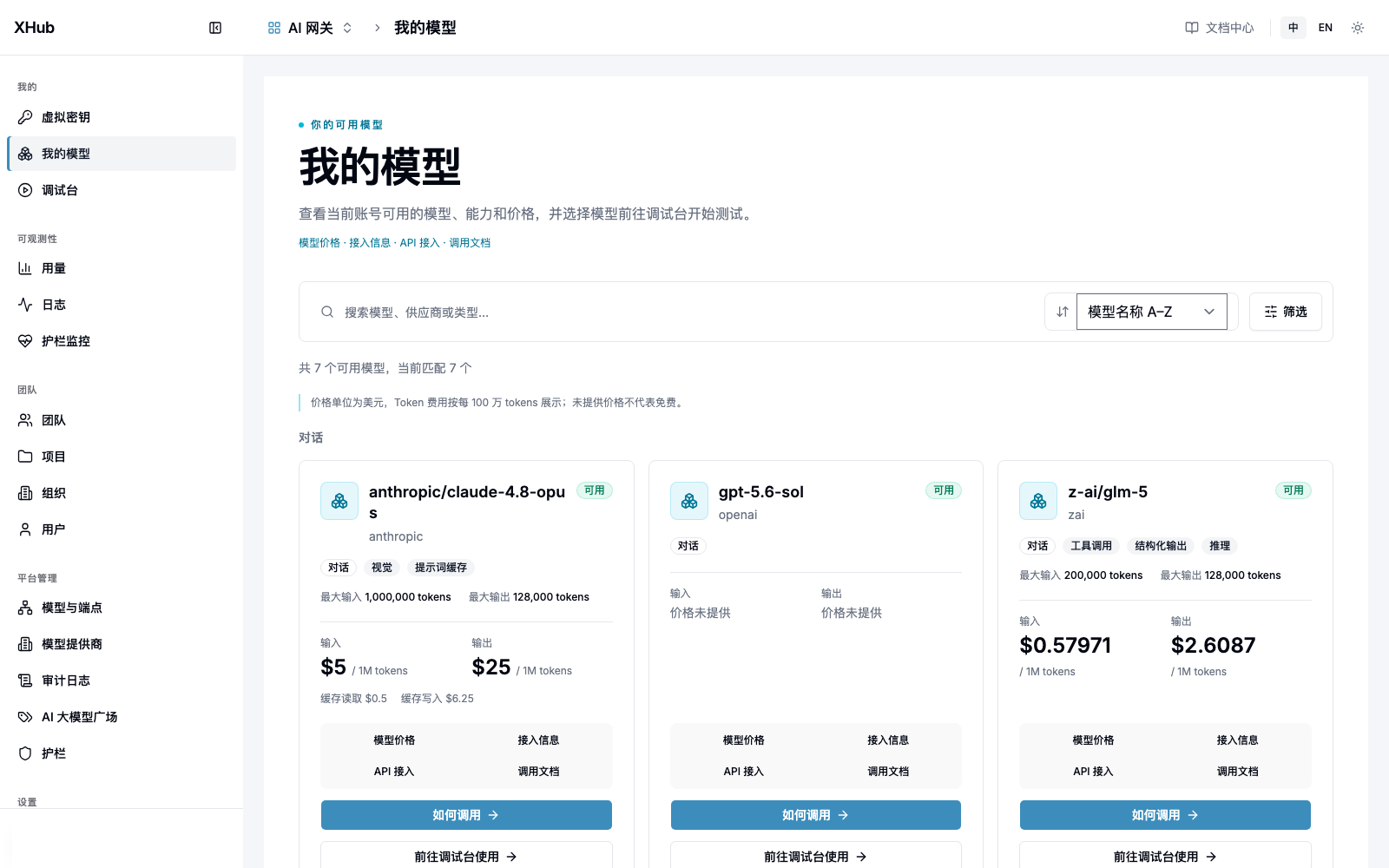
Figure 4: Open the Playground from an available model card. The model, price and capability labels come from demonstration configuration and do not imply that every model supports them. Click to open the full screenshot.
Test in the console before integrating your application
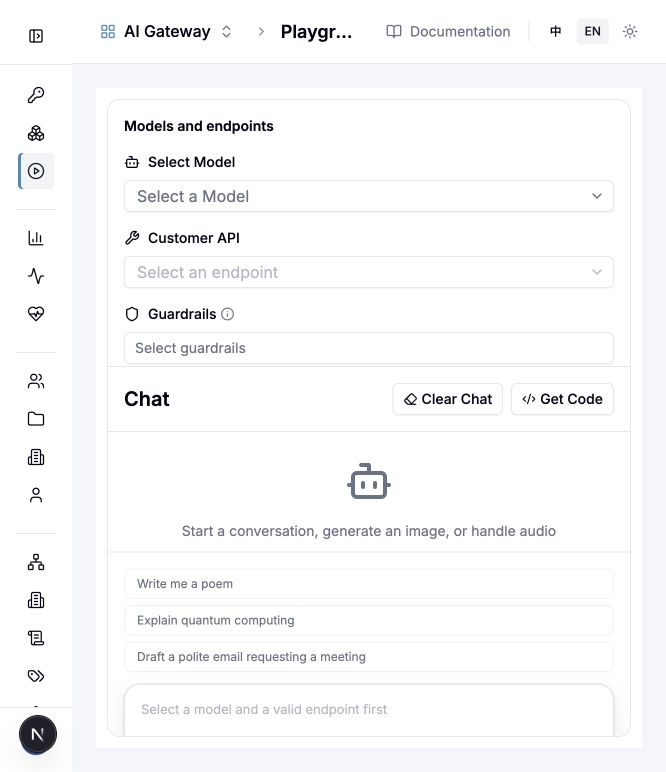
- Open Playground (
/playground). Select the public model in Select Model, then a supported Customer API. The endpoint selector and send button remain unavailable until the required selections are valid. - Expand Connection settings to inspect the request connection before sending. Provider authentication stays in the saved provider; do not paste the supplier's key into an application example.
- Enter an English test prompt, for example
Reply with the word ready.Sending executes a real request and may incur supplier charges. The screenshot is the initial selection screen, not a successful-call result. - Use Get Code to inspect the selected operation's example. For an external application, use the gateway address and an authorized XHub virtual key, not the console address or a provider secret.
Install the OpenAI Python client with pip install openai. Set your virtual key and public model name:
export XHUB_API_KEY="YOUR_XHUB_VIRTUAL_KEY"
export XHUB_MODEL="YOUR_PUBLIC_MODEL_NAME"import os
from openai import OpenAI
client = OpenAI(
api_key=os.environ["XHUB_API_KEY"],
base_url="http://localhost:4000/v1",
)
response = client.chat.completions.create(
model=os.environ["XHUB_MODEL"],
messages=[{"role": "user", "content": "Hello, XHub!"}],
)
print(response.choices[0].message.content)Replace the gateway URL for your deployment. A URL on port 3000 points to the console and can return HTML instead of an API response. For other operations, check the configured deployment's capability and use the corresponding supported API.
7. Configure routing
Manage templates at /route-templates with an account authorized for the target scope. The bindable selection precedence is key → team → organization; if none is selected, built-in platform settings use model-managed deployment defaults. Clearing a selection restores inheritance. The selected template replaces the parent template as a whole; fields do not merge across scopes. Projects and accounts do not have a separate template assignment.
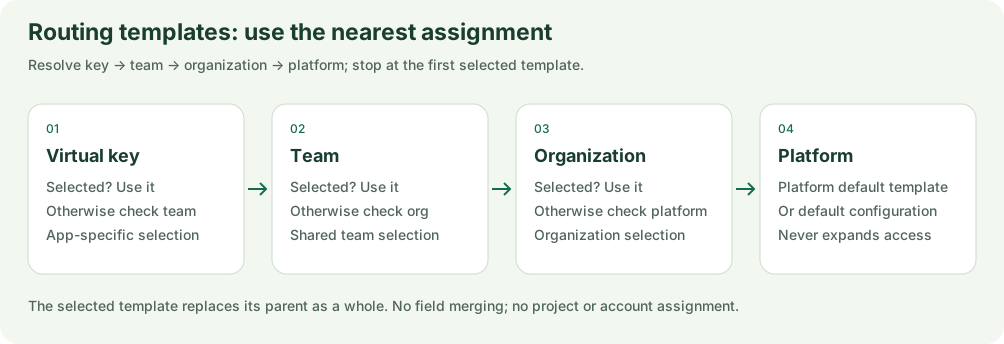
Figure 5: Check assignments from left to right. Clearing a key's selection restores the team or higher-level selection.
| Setting | Current behavior |
|---|---|
simple-shuffle / random |
Uniform random selection, independent of deployment weights |
traffic-split |
Relative weighted traffic allocation; zero weight excludes a deployment. Affinity and cooldown can change observed ratios. |
| Cost selection | Compares input-token price, rather than estimating the full request bill |
Template retry_policy.max_attempts |
Total attempts per deployment, including the first. All four reliability fields are required. |
| Timeout | Per upstream attempt; default 60 seconds, rather than a deadline for the entire request |
Deployments of the same public model can fail over. Configure cross-public-model or model-group fallback chains for general errors, context limits, and provider content-policy errors. Templates cannot expand model access or bypass budgets; local guardrail blocks do not trigger provider content-policy fallback. See the routing reference for fields and inheritance semantics. Fallback happens only before response bytes are emitted and can be disabled per request with disable_fallbacks:true; pinned continuations, native asynchronous creation, and Responses background requests are not replayed on another model.
8. Read usage, costs, and logs
Use /usage for trends and breakdowns and /logs for individual calls. Visibility follows the current account's role and scope. Keep the response's x-litellm-call-id when investigating a call. Platform administrators can read administrative audit records through GET /audit.
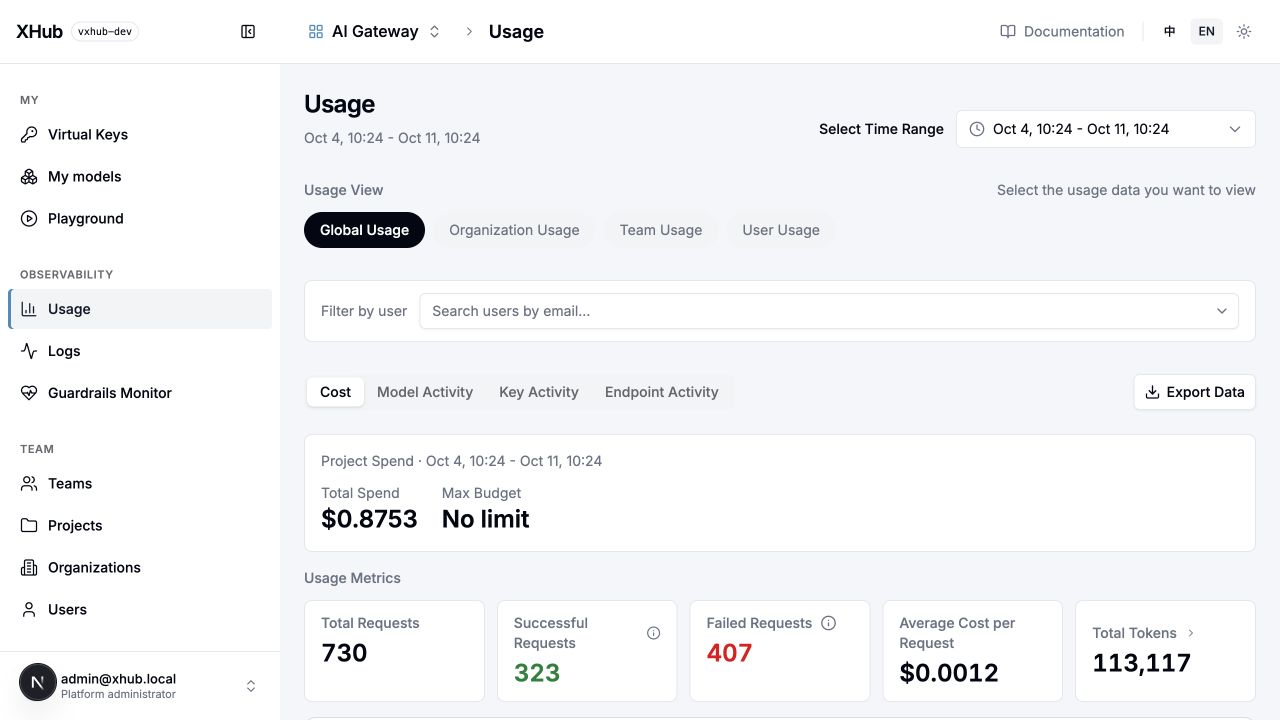
- Set Select Time Range to include the request you just sent. An empty period is not evidence that the request was free.
- Choose Global Usage, Organization Usage, Team Usage, or User Usage within your permissions. Use Filter by user to narrow a global view; do not compare totals from different time ranges or scopes.
- Start with Cost and Usage Metrics: compare total requests, successful/failed requests, total tokens, and spend. Switch to Model Activity, Key Activity, or Endpoint Activity to locate the relevant dimension.
- Open Logs for the individual request. Compare its status, timing, usage and cost with the response call ID. An aggregate chart alone does not explain a particular failure.
The screenshot shows local development records, not a price quote or service-level guarantee. Both language screenshots use the same view; their recorded values can change as other requests run. Click any screenshot to open the full-size original.
- Request prices are snapshotted so later price changes do not alter that request's recorded cost. Records without a price snapshot may be recomputed from current pricing and are identified as recomputed.
- Gateway response-cache hits have zero upstream cost. A provider's prompt-cache hit can still incur charges.
- Failed or interrupted requests can show zero local cost even if the provider charged them. Missing usage may be estimated. Missing prices require investigation.
- User, key, team, project, and organization totals describe the same calls from different dimensions. Adding them together double-counts spend.
- RPM/TPM use shared minute counters with Redis, or process-local sliding windows without Redis. For multiple gateway processes, configure shared runtime state.
Prompt/response storage is optional, controlled by general_settings.store_prompts_in_spend_logs. Scoped administrators can inspect stored content. Decide whether to enable it based on your data requirements and configure retention in your operations process; this setting does not provide automatic encryption or a retention policy.
The pricing reference explains rate units, snapshots, and settlement. The runtime reference describes cache, idempotency, streaming, and task boundaries.
9. Remove access safely
- Assign another team administrator if necessary.
- Remove the user's team membership. Personal keys remain stored; subsequent requests validate current membership, key scope, and billing authorization. Recorded usage retains its original attribution.
- Revoke or rotate service keys whose secrets the departing member knew. Service keys belong to a team or project and do not automatically expire when a member leaves.
- Remove organization-administrator assignments separately. For full account offboarding, have a platform administrator disable the account.
10. Troubleshoot common problems
| Symptom | Check |
|---|---|
| No available models | Team membership, team/project/key model scope, configured deployments, and operation capability |
401 |
Correct virtual key, expiry/revocation, disabled account, or an old session after a password reset |
403 or a hidden object's 404 |
Role and resource scope, blocked team, model permission; 403 budget_exceeded means the budget is exhausted |
429 |
Key RPM/TPM and upstream rate limits |
502 / 503 |
Upstream secret, API base/model ID, deployment health, database/Redis, route template, and call log |
| SDK receives HTML | Gateway URL should normally use port 4000, not console port 3000 |
| Stream stops midway | Inspect the call log; decide whether the application can safely make a new request |
| Unexpected zero cost | Response cache, failed call, missing rate, or missing upstream usage; compare provider billing |
Idempotency 409 |
The same idempotency key was reused with changed raw request body or query |
| Cannot remove the last team administrator | Assign a replacement first |
| Changing the configured admin password has no effect | Configuration seeds a new account only; change/reset the existing account's password in the console |
For supported provider content-generation tasks, query with the same virtual key and provider route used to create the task. Task pins last seven days. XHub does not provide a universal media cancellation, callback, or download workflow.
11. Operate and upgrade the instance
Use the installation guide for external URLs, environment secrets, and Docker configuration. Back up PostgreSQL and deployment configuration before upgrades; validate a restore in a separate database.
For a code change or reproducible defect, include the affected operation, public model name, call ID, expected result, and relevant redacted logs. Developers can start with the code and AI programming guide.
Administrators explicitly create providers by selecting a type and entering its authentication fields. Manual price refresh and enabled scheduled reload use https://api.modelink.ai/v1/market/models by default; XHUB_PRICE_FEED_URL overrides the feed. Failures preserve the current catalog and operator overrides remain independently managed.