Providers and model deployments
Configure NewAPI, develop Suno protocols and verify real calls
Choose UI configuration or protocol development
Provider names are not protocols. If NewAPI implements OpenAI Chat, create a custom_openai credential in XHub and bind the deployment to the registered bypass_openai_chat; no provider directory is needed. Different authentication or paths need a Transport for the existing protocol; new request, response and task structures need protocol development. Prices, logos and credential forms do not establish execution support.
NewAPI: connection, deployment, key and call
Add company-newapi on the Model providers page and enter its service address and NewAPI key in the provider form. In the model form, enter public name company-chat and an account-authorized upstream model, select company-newapi and OpenAI Chat, confirm pricing and save the deployment. Manage address and authentication only on the model provider; do not repeat them in deployments. Reload, create an XHub virtual key authorized for company-chat, and call /v1/chat/completions. Applications hold only XHub keys. Complete this in the UI without editing model_list.
Suno: no built-in music task executor
There is no Suno executor or music endpoint today. Identify the actual authorized API, NewAPI plugin or third-party relay, then obtain creation/polling paths, authentication, task IDs, terminal states and billing units. Music JSON is not audio/speech, and custom_llm_provider=suno cannot install a protocol. Implement and test creation, original-identity polling, failures, multiple songs and deduplicated settlement.
Step 1: save the provider connection
Open Model providers → Add provider. For this Chat example, choose Custom Openai, enter Provider name company-newapi, and fill API Base and API Key here. Leave Provider catalog ID blank for ordinary Chat models; it is a dedicated catalog identifier, not the connection name.
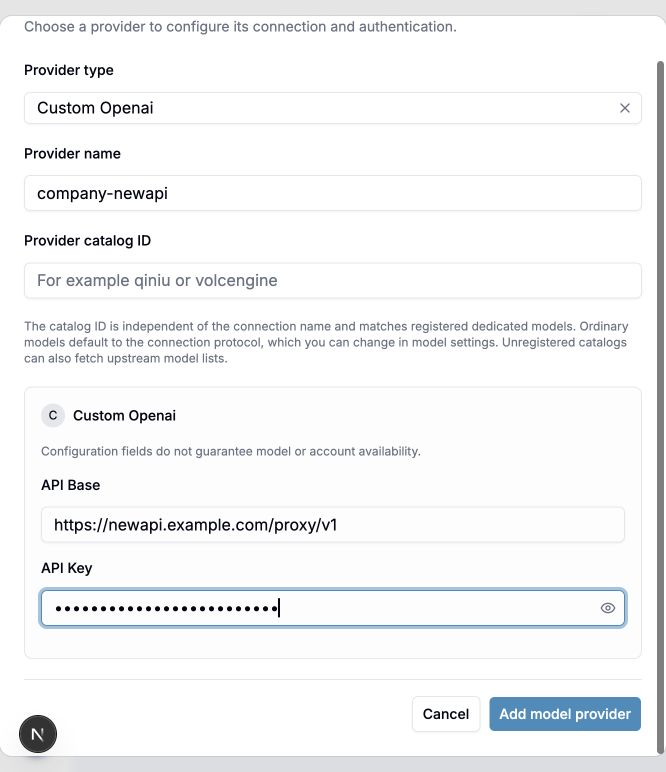
The address and masked key are fictional demonstration values. Save your own connection; this screenshot is not proof of a tested NewAPI account.
Step 2: add the model deployment
Open Models + Endpoints → Add Model. Select the saved connection in step 1 to unlock the model section. Enter the upstream model ID and public name, choose the upstream protocol, then select catalog pricing or enter actual manual rates. Save and refresh to verify.
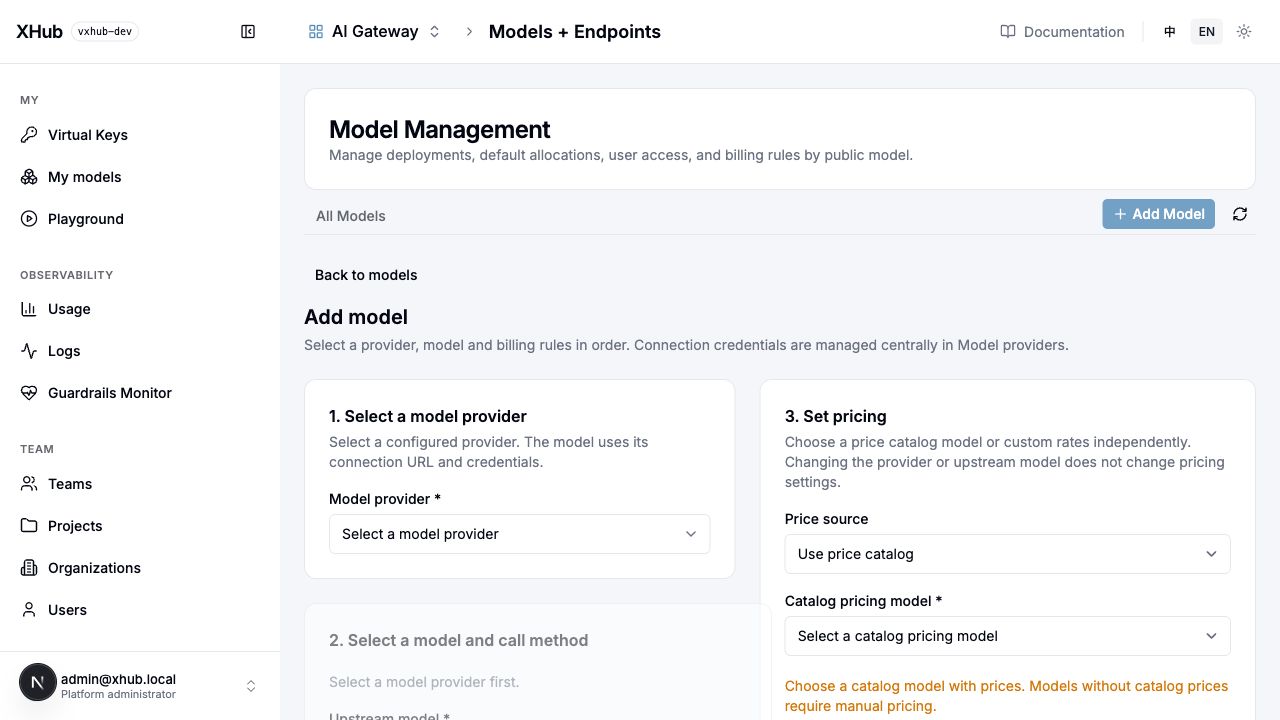
This screenshot shows the initial unselected form. Disabled model fields mean you must select a provider first. Do not enter an address or key here or edit model_list.
Source changes for a new provider
- internal/provider/contract/type.go: check Action, AuthConfig, TaskID and TaskBilling against the real contract.
- internal/provider/capability/endpoints.go: register a new media endpoint and compatibility.
- internal/provider//: register Transport protocol, authentication and operation allowlist; see qiniu/seedance.go. Use RegisterModel for specialized catalog/TransportID bindings.
- internal/provider/all/all.go: import the package, rebuild and restart. A directory alone is not loaded.
- internal/dataplane/execution/official.go, transport and gateway: verify entry dispatch, native payloads, task ownership and errors; registration does not implement every execution behavior.
- internal/provider/measurement and internal/catalog: separate successful facts from rates, preserve unpriced states and extend complex music pricing.
- Model setup, Playground and bilingual API: add parameters, polling and results, plus unit tests, real backend regression and browser E2E.
Checks after saving
- Discovery failures allow confirmed manual IDs; successful discovery does not prove inference. Verify non-streaming, streaming, tools and application parameters separately.
- API roots can retain /proxy/v1; do not enter a full operation URL. Discovery paths do not change inference protocols.
- Normal deployments reference model providers without repeating addresses or keys. Deployment-level api_base values take precedence; provider resolution fills empty addresses.
- Connection Test may incur charges and bypasses full quotas, routing and accounting. Make a virtual-key request and inspect usage and price snapshots.
- A creation timeout does not prove rejection. Do not blindly resend paid tasks. Generic background polling, budget reservation and Suno callbacks are not implemented.
The full bilingual UI guide, curl calls and source checklist are in docs/development/en/provider-catalog.md, under the website's Models & integration navigation.